| Summary: | Colorized cgit at git.yoctoproject.org | ||||||
|---|---|---|---|---|---|---|---|
| Product: | [Infrastructure] Infrastructure General | Reporter: | Jate Sujjavanich <jatedev> | ||||
| Component: | infrastructure-general | Assignee: | Michael Halstead <mhalstead> | ||||
| Status: | RESOLVED FIXED | QA Contact: | |||||
| Severity: | normal | ||||||
| Priority: | Medium | CC: | Martin.Jansa, ralphs, randy.macleod | ||||
| Version: | unspecified | ||||||
| Target Milestone: | 5.1 | ||||||
| Hardware: | x86 | ||||||
| OS: | Multiple | ||||||
| Whiteboard: | |||||||
| OS type for building Yocto: | --- | Type of Regression: | --- | ||||
| Verified: | Documentation change: | Don't know | |||||
| Attachments: |
|
||||||
|
Description
Jate Sujjavanich
2024-03-11 19:45:12 UTC
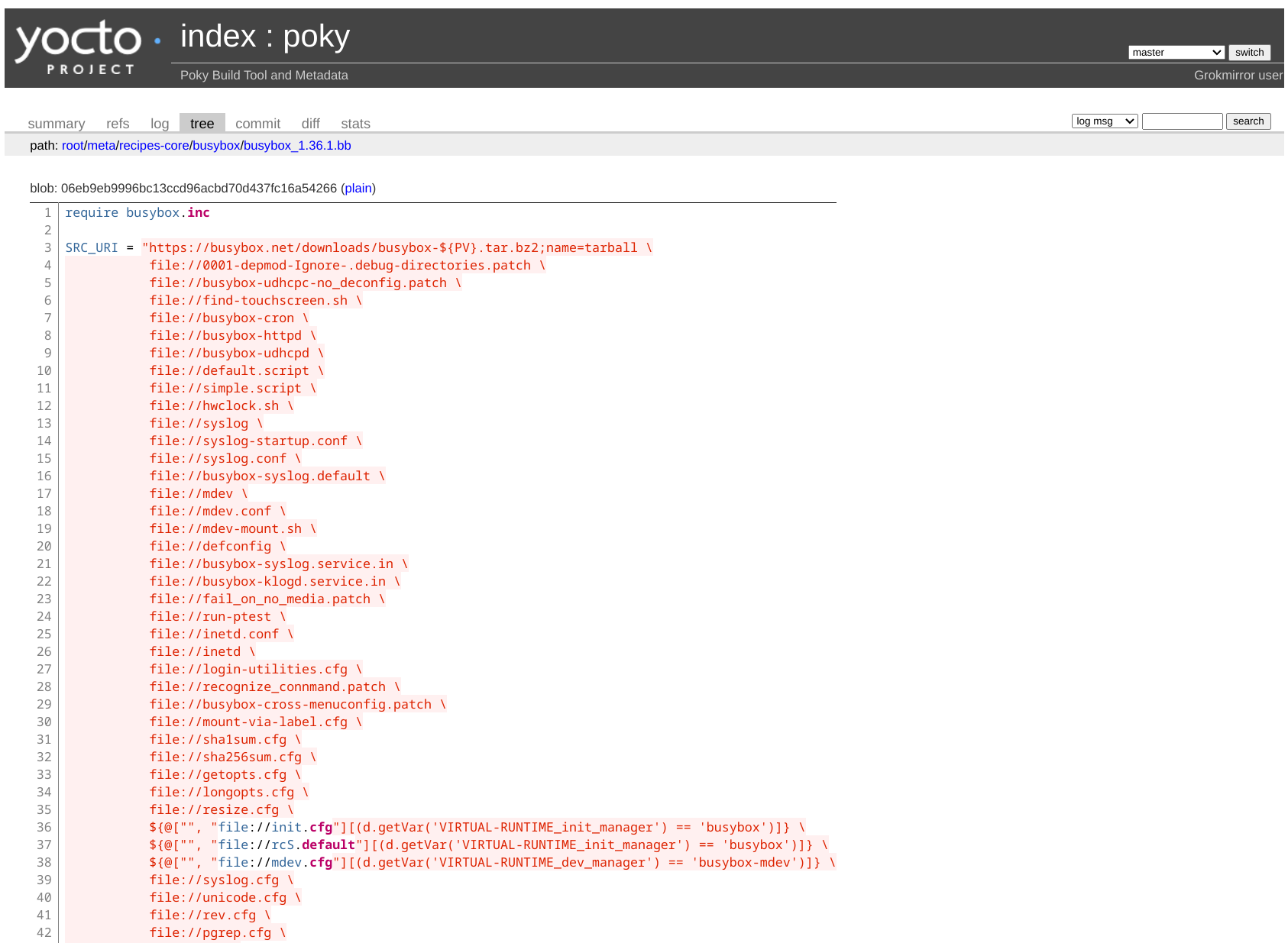
I far as I can tell the javascript issue is not effecting the color. Does this screenshot match what you see? https://wiki.yoctoproject.org/wiki/images/b/b8/Screenshot_from_2024-03-11_12-54-38.png Created attachment 5027 [details]
image of color problem
See the attached for what I'm seeing
Half the bugboard team sees red and half see yellow. People are going to add a comment with their env to see if we see a pattern. Seems to be related to which desktop style (light or dark) you pick. We should test in both modes to ensure that the pages are easy to read. OS: Macos Ventura OS Theme: Dark Browser: Firefox Browser Theme: Dark That resulted in the screenshot I posted earlier with light text on a white background. I switched the Browser theme to light, and the text becomes dark text appropriate for the light background. I located a Firefox extension called Dark Reader which works per website, so I have a workaround. It makes the background for the body of the page dark. I do seem to remember that the background color used to be uniformly grey for Firefox browser dark mode matching the header (where the Yocto Project logo is). This extension chooses a body page background of a bit darker color. In chrome 127 on Gentoo I see the same as fullstop shared on #yocto on 2024-07-30 https://i.imgur.com/VxdyUNj.png and this is with chrome://flags/#enable-force-dark kept on Default or Disabled, if I switch this to Enabled then its's dark and readable). Chrome 127 on Xubuntu works well with dark mode forced enabled as well as disabled, but the colors are different (variable names blue and value orange-red, while on gentoo it's white variable names and yellow values). Actually I think the text has the same color with and without dark mode forced, but the color combination on gentoo doesn't work with light background. https://septatrix.github.io/prefers-color-scheme-test/ shows Browser exposes prefers-color-scheme as: dark on my gentoo (with or without dark mode forcing background to change) while on xubuntu: Browser exposes prefers-color-scheme as: light again with or without dark background (but light text scheme is readable in both). I see similar behavior on Chrome, Edge and Firefox. In light-theme the text is readable, but in dark mode, it is almost impossible.
The root cause seems to be that there is no background color specification. The stylesheet does include one:
@media only all and (prefers-color-scheme: dark) {
.highlight .hll { background-color: #49483e }
@media (prefers-color-scheme: light) {
.highlight .hll { background-color: #ffffcc }
But there are no elements using the "hll" class, and so this has no effect. Removing the ".hll" from the stylesheet causes the background color to be applied to all of the problematic lines, greatly improving readability for dark backgrounds.
However, note that the overall page background remains white, even when dark mode is requested. The above "fix" only works for the source code block.
So perhaps we could consider removing the extra styling, and rely on the existing cgit.css as seen on the upstream https://git.zx2c4.com/cgit/ which seems to handle light and dark modes just fine in my quick tests.
Further info: the upstream https://git.zx2c4.com/cgit.css seems to use: @media only all and (prefers-color-scheme: dark) { html, div#cgit { color: #eee; background: #171717; } Note the comma between the selectors, so this applies the dark background to both the root html element, as well as the div#cgit (necessary because dev#cgit itself asks for white). Thank you for the fix. I've deployed it and tested in Firefox in dark theme. Please reopen if the issue persists in other environments. Sigh, and hurrah!! Thanks Ralsh, I can see (commit logs) clearly now!! |